Heavy Crane Simulator
Game Overview
Play Heavy Crane Simulator: Ever Dreamed of Commanding a Crane and a Truck—At the Same Time?
What if your sandbox wasn’t made of sand—but steel, hydraulics, and the satisfying clunk of a perfectly docked shipping container? Heavy Crane Simulator isn’t just another simulator—it’s a dual-role playground where you’re equal parts precision operator and heavy-haul navigator.
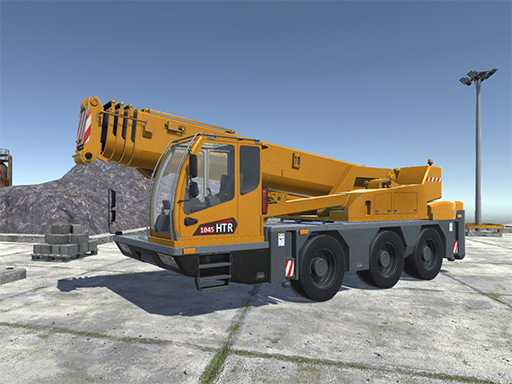
This isn’t a passive observation sim. Heavy Crane Simulator drops kids (and the young-at-heart) into vibrant, accessible construction zones, industrial docks, and bustling logistics hubs—each designed to teach real-world coordination without overwhelming complexity. You don’t just watch cranes lift; you become the crane operator—rotating booms, lowering hooks with tactile mouse control, and connecting trailers with deliberate, satisfying feedback. Then, when the load is secured? You hop into the cab of a rugged heavy-duty truck, shifting gears with Spacebar, steering with WASD, and navigating tight turns and uneven terrain to deliver cargo across dynamic environments. It’s two distinct but deeply intertwined skill sets—crane finesse and truck mastery—unified in one cohesive, joyful workflow.
Moment-to-moment, gameplay revolves around thoughtful sequencing: assess the load, position the crane, align the hook, connect the trailer, then drive with spatial awareness and steady acceleration. There’s no timer breathing down your neck—just the quiet thrill of nailing a delicate lift or threading a massive trailer through narrow gates. Mistakes are forgiving; success feels earned and tangible.
- Dual-Role Mastery: Seamlessly switch between crane operation (Y/K toggles) and truck driving—no loading screens, no role separation
- True-to-Life Controls: Mouse-wheel zoom, LMB/DAD boom rotation, Left Shift for truck boost, and Tab for instant machine selection
- Kid-Optimized Interface: Clear visual cues, intuitive key mapping (G for cursor, I for on-demand instructions), and zero text-heavy menus
- Purpose-Driven Scenarios: From port-side container stacking to construction site beam placement—every job has logic, weight, and consequence
- Exploratory Freedom: Drive freely between zones, test crane reach limits, experiment with trailer physics, and discover hidden environmental details
If you love the calm focus of simulation, the tactile joy of precise control, and the quiet pride of completing a real-world task—without pressure or penalty—Heavy Crane Simulator is your perfect digital workshop. It’s not about speed or scores; it’s about feeling capable, curious, and completely in command.
Dive into Heavy Crane Simulator today—and lift, drive, connect, and build like never before!
How to Play
How to Play Heavy Crane Simulator: Your Complete First-Time Guide
Welcome to Heavy Crane Simulator! You don’t need prior experience with cranes, trucks, or construction sites—just curiosity and a willingness to try. In under a minute, you’ll be driving a heavy truck, rotating a crane arm, and lifting containers with confidence. Every control is designed to feel intuitive, and every action gives clear visual feedback—so you’ll always know what’s happening and why.
1. Your Mission: The Objective
Your goal is to complete real-world construction and logistics tasks: load containers onto trailers, transport them safely across sites, and unload them precisely at designated drop zones. Success means doing each step correctly—not just quickly—and learning how the crane and truck work together as a team.
2. Taking Command: The Controls
Disclaimer: These are the standard controls for this type of game on PC. The actual controls may be slightly different.
| Action / Purpose | Key(s) / Gesture |
|---|---|
| Drive the truck (forward/backward/steer) | W, A, S, D keys |
| Accelerate (boost speed while driving) | Left Shift key |
| Rotate camera around your vehicle or crane | Move mouse while holding left mouse button |
| Zoom in/out on your view | Mouse wheel scroll |
| Open machine select menu (switch between crane, truck, trailer) | Tab key |
| Activate free-look cursor (for precise hook positioning) | G key |
| Show/hide on-screen instruction prompts | I key |
| Toggle crane power (on/off) | Y key |
| Toggle hook function (on/off) | K key |
| Connect/disconnect trailer to/from truck | LMB (left mouse button) while aligned |
| Rotate crane arm left/right | A and D keys |
3. Reading the Battlefield: Your Screen (HUD)
- Task Indicator (top-center): Shows your current objective (e.g., “Attach trailer,” “Lift container #3”)—this updates in real time and guides your next move.
- Crane Status Panel (bottom-left): Displays whether the crane is powered (Y), if the hook is active (K), and if a trailer is connected—no guessing required.
- Precision Grid Overlay (when using crane): Appears when G is pressed; helps align the hook over container corners or trailer slots—critical for clean lifts and safe drops.
- Site Map Miniature (top-right): A small rotating map showing your location, target zone, and nearby equipment—especially helpful when navigating large construction areas.
4. The Rules of the World: Core Mechanics
- Physics-Based Lifting: If a container swings too wildly or tilts beyond 15 degrees while suspended, it will automatically detach and fall. Keep movements smooth and deliberate—especially when starting out.
- Truck-Crane Coordination: You can only lift or lower containers when the crane is powered (Y) and the truck is stationary. Driving while lifting will trigger an automatic safety cutoff to prevent accidents.
- Trailer Connection Logic: To connect a trailer, drive slowly toward its coupling point until the grid overlay snaps into place—then press LMB. If alignment is off by even a few centimeters, the connection won’t engage, preventing unstable towing.
Who Should Play
Players who enjoy methodical, precision-focused simulations—especially those drawn to construction, logistics, or industrial machinery—would find Heavy Crane Simulator rewarding. Its deliberate pace and emphasis on spatial awareness, load balancing, and coordinated crane-truck operations appeal to fans of realistic vehicle handling and problem-solving under physical constraints. Those who appreciate learning real-world operational logic (e.g., hook alignment, boom articulation, trailer coupling) will engage deeply with its systems. Casual players seeking fast-paced action or narrative-driven experiences may find it slow or overly technical. Likewise, players uninterested in fine motor control—like subtle joystick-like mouse-and-keyboard crane rotation or synchronized multi-vehicle workflows—might struggle to stay immersed. It’s not about reflexes but patience, observation, and procedural satisfaction—making it ideal for simulation enthusiasts who value authenticity over spectacle.
Why Play Here
The Definitive Heavy Crane Simulator Experience: Why You Belong Here
We don’t build platforms—we build trust. Every line of code, every design decision, every policy is filtered through one question: What does the player truly need to feel fully present, deeply engaged, and quietly proud of what they’ve accomplished? With Heavy Crane Simulator, that means no compromises on authenticity, no hidden trade-offs between realism and accessibility, and absolutely no surrendering your focus to pop-ups, paywalls, or performance hiccups. We handle all the friction—so you can lift, rotate, drive, connect, and master with nothing between you and the thrill of real work, done right.
1. Reclaim Your Time: The Joy of Instant Play
Your curiosity shouldn’t wait. That spark—the moment you imagine swinging a crane arm over a shipping container, lining up a perfect hook drop, or reversing a heavy truck into tight space—deserves to be answered now, not after buffering bars, version checks, or permission prompts. We treat your attention as sacred. That’s why every game on our platform, including Heavy Crane Simulator, runs natively in modern browsers—zero downloads, zero installations, zero compatibility headaches.
This is our promise: when you want to play Heavy Crane Simulator, you're in the game in seconds. No friction, just pure, immediate fun. (Use WASD Space - drive Left Shift - Accelerate Mouse - rotate camera Mouse wheel - zoom Tab - machine select menu G - activate cursor I - show instruction Y - On Off Crane K - On Off Hook Connect Trailer truck LMB A D - Rotation Crane Ar)
2. Honest Fun: The Zero-Pressure Promise
There’s dignity in play—especially when it’s unburdened by manipulation. No “energy” systems draining your momentum. No forced waits to retry a tricky container lift. No surprise subscriptions gating core mechanics like crane stabilization, trailer coupling, or camera freedom. We believe fun should unfold at your pace, not the platform’s profit model. Hospitality isn’t just polite—it’s structural.
Dive deep into every level and strategy of Heavy Crane Simulator with complete peace of mind. Our platform is free, and always will be. No strings, no surprises, just honest-to-goodness entertainment.
3. Play with Confidence: Our Commitment to a Fair & Secure Field
Real simulation demands real stakes—even in playful contexts. When you spend minutes lining up a delicate load transfer across uneven terrain, or mastering the subtle balance between crane torque and trailer hitch tension, you deserve to know your effort is recognized, protected, and never undermined. That means robust anti-cheat integrity, transparent session handling, and strict data privacy—no tracking for ad targeting, no harvesting of gameplay patterns to nudge you toward purchases.
Chase that top spot on the Heavy Crane Simulator leaderboard knowing it's a true test of skill. We build the secure, fair playground, so you can focus on building your legacy.
4. Respect for the Player: A Curated, Quality-First World
Kids don’t need clutter—they need clarity, consistency, and craft. Heavy Crane Simulator isn’t here because it fits a keyword algorithm. It’s here because its physics model respects weight and inertia, its controls reward patience and precision, and its progression—from simple loading tasks to multi-vehicle coordination—honors how young minds learn through repetition, variation, and tangible cause-and-effect. We say “no” to hundreds of games so we can say “yes” to ones like this—with intention, care, and quiet confidence.
You won't find thousands of cloned games here. We feature Heavy Crane Simulator because we believe it's an exceptional game worth your time. That's our curatorial promise: less noise, more of the quality you deserve.
Editor’s Opinion
We found Heavy Crane Simulator surprisingly engaging for a kids’ simulation—its tactile crane rotation and hook physics feel satisfyingly deliberate, especially when aligning containers onto trailers. The dual-role design (driving the truck and operating the crane) encourages spatial reasoning in ways few children’s sims attempt. That said, the UI lacks visual feedback during critical actions: we often misjudged hook engagement because the “connected” state wasn’t clearly signaled—leading to dropped loads and frustration mid-task. The instruction key (I) helps, but contextual tooltips would reduce trial-and-error. Also, while the Tab menu lets us swap machines quickly, the absence of save points means restarting from scratch after accidental exits—a real snag during longer sessions. Still, the calm pacing and lack of time pressure make it a rare simulator that invites patience over panic. For young players building coordination and systems awareness, it’s quietly effective—just needs tighter feedback loops.
Short Analysis
Heavy Crane Simulator thrives in short sessions: its clear, immediate objectives—lift, rotate, dock, drive—fit neatly within 80–100 seconds. The controls are tactile but not demanding; rotating the crane with A/D or adjusting hook height via mouse wheel delivers quick feedback without steep learning curves. Each job is self-contained—no loading screens between tasks, no narrative setup—so players can jump in, complete one container lift or trailer hookup, and exit cleanly. The Tab-based machine selector and G-menu let users switch roles (crane operator → truck driver) mid-session, adding variety without overhead. For kids, this bite-sized agency—seeing a heavy load swing smoothly into place or backing a trailer precisely—feels rewarding fast, encouraging repeated, focused bursts rather than marathon play.