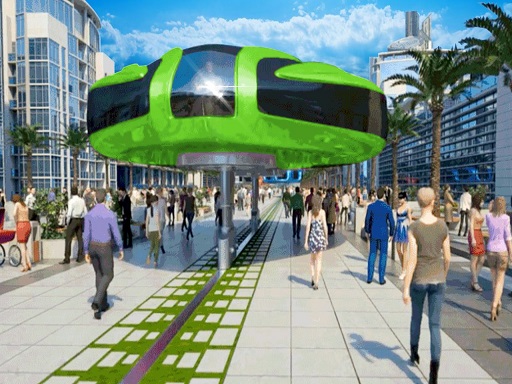
Gyroscopic Elevated Bus Simulator Public Transport cover

Adventure game

Gyroscopic Elevated Bus Simulator Public Transport

Drive a straddling sky bus along elevated city rails, collecting commuters and delivering them across a busy 3D metropolis.

Difficulty
Moderate
Compatibility
See device support below

Game overview

Gyroscopic Elevated Bus Simulator Public Transport puts you behind the wheel of a straddling sky bus that rides above city traffic on an elevated rail. Your shift is a pickup and drop-off circuit: pull into each marked stop, load the waiting commuters and tourists, then thread the raised route across the metropolis without clipping the guideway. The gyroscopic frame makes every turn feel top-heavy, so smooth steering pays better than speed.

This title is best suited to players who enjoy methodical transport driving missions.

How to play Gyroscopic Elevated Bus Simulator Public Transport

  1. Pull the bus out of the depot and onto the elevated guideway
  2. Slow early and line up square with each marked stop
  3. Wait for passengers to board before pulling away
  4. Follow the route guideline to the drop-off point

Controls

  • Steering wheel / tilt / buttons: Steer the elevated bus
  • Accelerator: Build and hold speed along the rail
  • Brake button: Slow down for stops and tight turns

Objectives and failure conditions

Objectives

  • Pick up passengers at every scheduled stop
  • Deliver each group to the correct destination
  • Finish the route without leaving the guideway

The run ends or fails when

  • The bus derails, hits traffic or misses its stop window

Gameplay mechanics

  • Elevated route driving with a high centre of gravity
  • Passenger pickup and drop-off objectives
  • Guideline navigation across a city map

Device compatibility

Desktop browsers

Mouse and keyboard: Gyroscopic Elevated Bus Simulator Public Transport loads straight into the page on desktop Chrome, Edge, Firefox and Safari with no download or plugin. Controls used: Steering wheel / tilt / buttons, Accelerator, Brake button.

Phones and tablets

Touch controls: Gyroscopic Elevated Bus Simulator Public Transport mirrors its keyboard inputs on on-screen buttons, so phones and tablets stay playable in portrait or landscape.

Tips for Gyroscopic Elevated Bus Simulator Public Transport

  • Brake well before a stop, since the tall frame settles slowly
  • Keep a steady throttle through curves instead of pumping it
  • Follow the on-screen guideline rather than guessing the next turn

What worked well and what did not

Pros

  • Unusual elevated vehicle concept
  • Clear mission structure with each route

Cons

  • Handling feels heavy until you learn the braking distance
  • City traffic scenery repeats between routes

Player comments

No published comments yet.