Passenger Airplane: Flight 3D cover

Adventure game

Passenger Airplane: Flight 3D

Fly real airliner routes or drill takeoffs and landings in a 3D flight sim with six camera angles, three weather states and no fuel limit.

Difficulty
Moderate
Compatibility
See device support below

Game overview

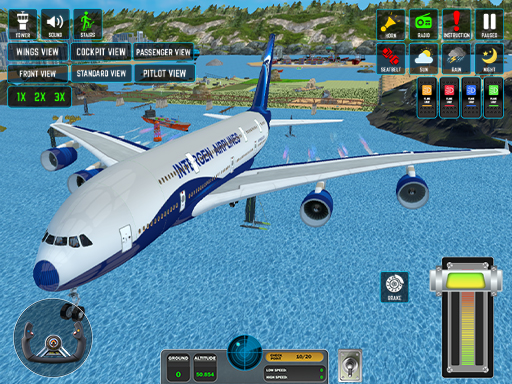
Passenger Airplane: Flight 3D hands you a full-size airliner and two ways to fly it: a world map mode that strings together real long-haul routes, and a training mode that drills takeoff, cruise and landing. The joystick reads pitch and roll, a speed selector jumps between 1x, 2x and 3x so long legs do not drag, and six camera angles let you fly from the cockpit, the wing or a wide chase view. Sunny, rainy and stormy weather change how much the airframe fights you, and no fuel gauge cuts a flight short.

This title is best suited to players who want a relaxed airliner flight without a fuel timer.

How to play Passenger Airplane: Flight 3D

  1. Pick training mode to learn the handling, or world map mode to fly a full route
  2. Ease the joystick back to lift off once your speed builds on the runway
  3. Switch cameras and set 2x or 3x speed for the cruise portion of the leg
  4. Bleed off speed and level the nose for a soft touchdown at the destination

Controls

  • Joystick / drag: Pitch and roll the aircraft
  • Speed selector: Switch between 1x, 2x and 3x time
  • Camera button: Cycle cockpit, wing and external views

Objectives and failure conditions

Objectives

  • Complete a scheduled route from takeoff to landing
  • Finish the training exercises to sharpen your handling
  • Land smoothly without stalling or over-banking

The run ends or fails when

  • The aircraft stalls or meets terrain during takeoff or landing

Gameplay mechanics

  • Joystick-driven pitch and roll flight model
  • Time compression for long legs
  • Weather states that change visibility and handling

Device compatibility

Desktop browsers

Mouse or trackpad: Passenger Airplane: Flight 3D loads straight into the page on desktop Chrome, Edge, Firefox and Safari with no download or plugin. Controls used: Joystick / drag, Speed selector, Camera button.

Phones and tablets

Touch controls: Passenger Airplane: Flight 3D is driven by pointer input, which maps to tap and drag on a touch screen.

Tips for Passenger Airplane: Flight 3D

  • Hold a gentle climb angle after takeoff instead of yanking the nose up
  • Use 3x speed for cruising, then drop back to 1x before the approach
  • Switch to the external camera on final to judge your height above the runway

What worked well and what did not

Pros

  • Roomy 3D cockpit and exterior camera work
  • Route flying and structured training in one package

Cons

  • Long routes stay quiet even at 3x speed
  • Handling is arcade-simple next to desktop simulators

Player comments

No published comments yet.