Train Simulator 3D
Game Overview
Steer, Brake, Succeed: Is This the Most Authentic Train Experience You’ll Play Today?
Forget joysticks and pedals—Train Simulator 3D puts the entire railway in your hands… with just your mouse. Welcome to a refreshingly tactile, surprisingly deep simulation where every gentle nudge of acceleration and precise feathering of the brake matters more than you’d expect.
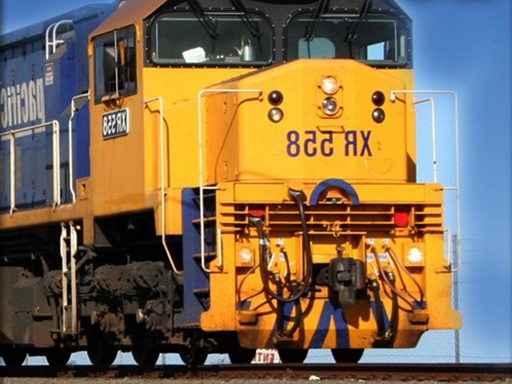
Train Simulator 3D isn’t just called a train simulator—it is one, distilled into its purest, most accessible form. Designed with kids at heart but engineered with real-world logic in mind, it invites players to step into the cab of a variety of locomotives—from sleek commuter shuttles to heavy freight haulers—and master the delicate art of rail operation. It’s not about flashy explosions or time trials; it’s about rhythm, anticipation, and spatial awareness as you navigate realistic routes, respect signal systems, and deliver passengers and cargo safely and on schedule.
In Train Simulator 3D, your mouse is the control panel. Click and hold to accelerate, release to coast, and click again—this time with measured pressure—to apply brakes. Timing is everything: brake too late approaching a station and you’ll overshoot; brake too early and you’ll stall awkwardly, disrupting schedules. You’ll learn to read terrain gradients, anticipate curves, and manage momentum across bridges and tunnels—all while keeping an eye on speedometers, signal lights, and platform markers. Each run builds muscle memory and confidence, turning abstract physics into intuitive mastery.
- Mouse-Only Precision Controls: No keyboard clutter—just responsive, expressive input that makes every braking decision feel intentional and satisfying
- Authentic Train Variety: Switch between distinct locomotives, each with unique weight, acceleration curves, and braking responsiveness
- Kid-Friendly Yet Genuinely Challenging Simulation: Built for accessibility, but layered with real operational nuance that rewards patience and practice
- HTML5 & WebGL-Powered Performance: Runs smoothly in any modern browser—no downloads, no installs, just instant rail immersion
- Calm, Focused Atmosphere: A soothing visual style and rhythmic gameplay loop perfect for mindful play and developing concentration
If you’ve ever watched trains glide past with quiet admiration—or if you’re a young player eager to explore complex systems in a safe, joyful way—Train Simulator 3D is your ticket to a world where responsibility feels rewarding and every smooth stop is a small triumph. It’s equal parts classroom and cockpit, blending learning with genuine satisfaction.
Dive into Train Simulator 3D today—and discover how much fun mastering the rails can truly be.
How to Play
How to Play Train Simulator 3D: Your Complete First-Time Guide
Welcome to Train Simulator 3D! You don’t need prior experience—or even a driver’s license—to start your train operator journey. In just a few minutes, you’ll learn how to accelerate, brake, and steer with confidence. This guide walks you through everything step by step, using only your mouse—no keyboard required. Let’s get your first train safely to the station.
1. Your Mission: The Objective
Your goal is simple but satisfying: drive each train from its starting point to the destination station without crashing or overshooting the platform. Every successful stop earns you points—and unlocks a new, more challenging train. Master smooth braking, steady speed control, and precise timing, and you’ll become a certified junior conductor in no time.
2. Taking Command: The Controls
Disclaimer: These are the standard controls for this type of game on mobile. The actual controls may be slightly different.
| Action / Purpose | Key(s) / Gesture |
|---|---|
| Accelerate (Speed Up) | Left Mouse Button (hold to increase speed) |
| Brake / Reverse (Slow Down or Stop) | Right Mouse Button (hold to decelerate; hold longer to reverse slowly) |
| Horn (Signal at stations or crossings) | Click Middle Mouse Button or Scroll Wheel Click |
3. Reading the Battlefield: Your Screen (HUD)
- Speedometer (bottom-left corner): Shows your current speed in km/h. Watch it closely—you must slow to ≤10 km/h before entering the station zone, or you’ll overshoot and fail the stop.
- Station Target Indicator (center-top): A colored marker (green = ready, yellow = approaching, red = too fast) that tells you whether your speed is safe for stopping at the upcoming platform.
- Train Type & Level (top-left corner): Displays which train you’re operating (e.g., “Freight Hauler” or “Express Commuter”) and your current level—helping you track progress and difficulty.
- Stop Accuracy Meter (after stopping): Appears briefly after arrival—it rates your stop as “Perfect,” “Good,” or “Too Far,” directly affecting your score and unlock progression.
4. The Rules of the World: Core Mechanics
- Speed-Braking Balance: If you press Accelerate too long, your train gains momentum quickly—but brakes take time and distance to work. Then, if you wait until the last second to brake, you’ll likely overshoot. So: start slowing earlier than you think you need to.
- Station Scoring: You earn base points for arriving, but bonus points depend entirely on stop accuracy. A “Perfect” stop (train doors aligned with the platform marker) gives +100% points; “Too Far” gives zero bonus and locks the next train until you retry.
- Track Signals & Hazards: Yellow signal lights mean prepare to stop at the next station; red means halt immediately—even if the station isn’t visible yet. Ignoring a red signal triggers an automatic emergency brake and deducts points.
Who Should Play
Players who enjoy methodical, physics-based challenges—especially those drawn to precision timing and gradual skill mastery—would find Train Simulator 3D rewarding. Its focus on throttle/brake balance appeals to fans of tactile simulation, even in simplified form. Casual players who like low-stakes, browser-based experiences with immediate feedback may also appreciate its accessibility and short-session appeal. Since it’s mouse-only and built in HTML5/WebGL, it suits users preferring lightweight, no-install games across devices. However, players seeking fast-paced action, deep progression systems, or narrative depth may find it repetitive over time—its minimalistic design prioritizes control practice over variety or storytelling. The lack of complex signaling, route planning, or environmental interaction means it won’t satisfy seasoned rail sim enthusiasts. Still, for those curious about train operation fundamentals—or just want a calm, focused diversion—it offers quiet satisfaction in small, deliberate victories.
Why Play Here
The Definitive Train Simulator 3D Experience: Why You Belong Here
We don’t build platforms—we build trust. Every decision we make, from how a game loads to how it feels in your hands, is filtered through one unwavering question: What would make this experience feel like it was made just for you? For players who value authenticity over flash, clarity over clutter, and respect over reach—this is where the noise stops and the real play begins.
1. Reclaim Your Time: The Joy of Instant Play
Your attention is sacred. Not something to be bargained with, buffered, or buried under layers of setup. When curiosity strikes—when you imagine the rumble of steel on rails, the weight of a throttle under your finger—you shouldn’t need permission, patience, or a tech manual to begin. That’s why every game on our platform runs natively in-browser, with zero downloads, zero installations, and zero compatibility checks. This is our promise: when you want to play Train Simulator 3D, you're in the game in seconds. No friction, just pure, immediate fun—Mouse Only (no keyboard, no setup, no second-guessing—just point, click, and go).
2. Honest Fun: The Zero-Pressure Promise
Fun shouldn’t come with fine print. There’s no “try before you pay,” no forced waits between runs, no energy systems disguised as charm. We believe joy is its own currency—and that true hospitality means removing all pressure to perform, convert, or conform. That’s why every feature, every level, every train in Train Simulator 3D is fully accessible from the first moment you land on the page. Dive deep into every level and strategy of Train Simulator 3D with complete peace of mind. Our platform is free, and always will be. No strings, no surprises, just honest-to-goodness entertainment—designed not to extract, but to engage.
3. Play with Confidence: Our Commitment to a Fair & Secure Field
A great simulation isn’t just about realism—it’s about integrity. When you master the delicate balance of acceleration and braking in Train Simulator 3D, that skill should mean something. Not because of luck, not because of exploits, but because you learned, you adapted, you earned it. We enforce strict anti-cheat protocols, anonymize data by default, and never monetize your behavior. Chase that top spot on the Train Simulator 3D leaderboard knowing it's a true test of skill. We build the secure, fair playground, so you can focus on building your legacy—not navigating loopholes.
4. Respect for the Player: A Curated, Quality-First World
We don’t chase volume—we curate intention. You won’t find hundreds of near-identical train games here, each vying for clicks with louder sounds and flashier thumbnails. Instead, we hand-select titles like Train Simulator 3D because they embody something rare: thoughtful design, intuitive physics, and genuine learning progression—even for kids. The interface stays silent unless needed. Ads are absent—not hidden, not minimized, but absent. You won't find thousands of cloned games here. We feature Train Simulator 3D because we believe it's an exceptional game worth your time. That's our curatorial promise: less noise, more of the quality you deserve.
Editor’s Opinion
We found Train Simulator 3D refreshingly accessible for younger players—its mouse-only controls eliminate setup friction and let kids jump straight into operating trains without wrestling with keyboards or complex UIs. The visual clarity of the 3D rail environments, rendered smoothly via WebGL, helps build spatial awareness as players navigate curves and stations. That said, the simulation depth feels intentionally shallow: braking response is overly forgiving, and no consequences follow missed stops or rough acceleration—something that weakens learning momentum over time. We also noticed occasional input lag when rapidly toggling between throttle and brake, likely tied to how the HTML5 engine handles mouse state polling. While it’s not aiming for realism, a subtle speedometer or audible feedback on acceleration changes would ground the experience more meaningfully. Still, as an entry point to vehicle operation concepts—especially for children aged 6–10—it succeeds where many simulators overwhelm. It’s simple, self-contained, and genuinely unintimidating.
Short Analysis
Train Simulator 3D thrives in short bursts—its 80–100 word sessions feel purposeful, not truncated. With mouse-only controls, each run is a tight loop: align the train, modulate speed, brake precisely for stations, and avoid collisions or stalling. There’s no progression gatekeeping; players jump straight into a new route or train variant (freight, commuter, monorail) in under five seconds. The difficulty curve emerges organically—not from unlocks, but from learning how each train’s momentum and braking latency respond to subtle mouse drag. Kids replay not for scores, but to master one station’s timing or nail a downhill coast. No loading screens, no menus—just immediate tactile feedback. That immediacy makes three-minute attempts feel like meaningful iterations, not filler.