Smash Diy Slime
Game Overview
Get Your Hands (Virtually) Dirty with Smash Diy Slime!
What if the most satisfying, stress-melting experience of your day involved no rules, no timers, and zero pressure—just pure, squishy, sensory joy? Enter Smash Diy Slime: not just a game, but a tactile digital sandbox disguised as slime.
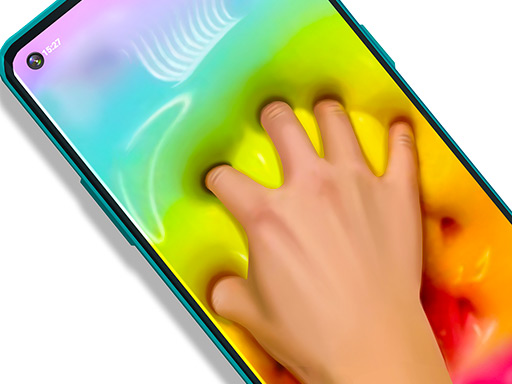
Smash Diy Slime reimagines creative play for the modern mobile and web era. At its heart lies an irresistibly responsive slime simulator—fluid, glossy, and deeply tactile—designed to trigger ASMR-level calm with every swipe, tap, or drag. This isn’t passive watching; it’s active feeling. You’re not managing resources or chasing scores—you’re engaging with texture, sound, and motion in real time. Whether you're unwinding after a long day or giving young creators their first taste of expressive freedom, Smash Diy Slime meets you where you are: in the moment, with your fingers on the screen.
The gameplay is beautifully intuitive: drag your finger (or mouse) across the screen to stretch, pop, swirl, and splatter vibrant slime. Each movement generates soft, resonant squelches and gentle visual feedback—bubbles rise, colors blend, and viscosity shifts dynamically. Then comes the magic: customize your very own slime masterpiece. Choose base colors, layer intricate patterns (think marble, glitter, galaxy, or neon swirls), add 3D-style decorations like stars, hearts, or candy bits, and even draw freehand strokes directly into the mix—watch them sink, ripple, and integrate organically.
- Tactile Sound Design: Professionally layered ASMR-grade audio responds authentically to every gesture—no two pops sound exactly alike.
- True DIY Slime Studio: Mix over 20+ patterns, 50+ decorations, and unlimited color combos—no two slimes are ever identical.
- Zero-Pressure Creativity: No goals, no fail states—just open-ended exploration and self-expression.
- Cross-Platform Polish: Built in HTML5 for seamless play on phones, tablets, and desktops—no downloads, no lag.
- Kid-Safe & Calming by Design: Bright, joyful visuals and soothing physics make it ideal for focused relaxation or gentle creative development.
If you’ve ever craved a digital escape that feels physical, if you love the quiet thrill of creation without critique, or if you simply need five minutes of pure, guilt-free sensory reset—Smash Diy Slime is your new go-to. It’s equal parts art tool, mindfulness aid, and joyful toy—crafted for anyone who believes play shouldn’t have an age limit.
Dive into Smash Diy Slime now—and let your fingers do the relaxing!
How to Play
How to Play Smash Diy Slime: Your Complete First-Time Guide
Welcome! You don’t need prior experience—just curiosity and a few seconds to begin. Smash Diy Slime is designed around calm creativity, not pressure or penalties. From your very first tap or swipe, you’ll feel immediate tactile feedback, soothing sounds, and visual flow. There’s no “wrong” way to start—every interaction is expressive, forgiving, and joyful. You’ll be shaping, squishing, and decorating your own slime in under 10 seconds.
1. Your Mission: The Objective
Your goal is to express yourself freely while enjoying the sensory satisfaction of slime manipulation. There are no timers, no fail states, and no scores to chase—just open-ended creation. Start by swiping to stretch and pop the slime, then explore customizing its look with patterns, decorations, and hand-drawn details. The more you play, the more intuitive and relaxing the experience becomes.
2. Taking Command: The Controls
Disclaimer: These are the standard controls for this type of game on mobile. The actual controls may be slightly different.
| Action / Purpose | Key(s) / Gesture |
|---|---|
| Activate & Stretch Slime | Mouse Click (desktop) or Tap & Hold (mobile) |
| Drag / Shape Slime | Mouse Drag or Finger Swipe |
| Apply Pattern or Decoration | Tap on a pattern icon or decoration item from the bottom toolbar |
| Draw Freestyle Lines | Tap the “Draw” tool, then drag across the slime surface |
3. Reading the Battlefield: Your Screen (HUD)
- Slime Canvas Area: The central interactive zone where all slime behavior happens—this is where stretching, popping, and drawing occur. Watch how it responds fluidly to your input; its bounce and sound confirm your action was registered.
- Toolstrip (Bottom Bar): A row of icons for patterns, decorations, drawing tools, and color pickers. This is your creative command center—tapping any icon instantly switches your mode of interaction.
- Undo/Reset Button (Top-Left Corner): A circular arrow icon that lets you reverse your last action or return the slime to its base state. It’s there to encourage experimentation without hesitation.
- Sound Toggle (Top-Right Corner): A speaker icon that mutes or unmutes the ASMR-like squish and pop sounds—essential for tailoring your relaxation experience.
4. The Rules of the World: Core Mechanics
- Tactile Feedback Loop: “Every swipe or tap creates visible deformation and an audible response—if you see the slime ripple and hear a soft schloop, the system has registered your input successfully.”
- Layered Customization: “Patterns apply first as a base texture; decorations (like stars or sprinkles) sit on top of them; and drawn lines go over everything—even mid-swipe. You can mix and reorder these layers freely.”
- Non-Destructive Editing: “Nothing you do permanently locks or breaks the slime. Even after heavy stretching or complex drawing, tapping ‘Reset’ returns it to a smooth, ready-to-customize state—no restarts needed.”
Tips & Strategies
Mastering Smash Diy Slime: An Advanced Strategy Guide
This is not a relaxation guide. This is a precision framework for players who treat slime physics like a quantifiable system—not a toy, but a scoring lattice. In Smash Diy Slime, high scores aren’t earned through randomness or passive tapping; they’re extracted via deliberate pattern manipulation, timing discipline, and an understanding of how the game’s hidden feedback loop converts gesture velocity, stroke continuity, and decoration density into exponential score multipliers. The leaderboard isn’t won by “having fun”—it’s claimed by those who treat every swipe as a calibrated input in a real-time simulation engine.
1. The Foundation: Three Golden Habits
These are non-negotiable entry requirements for top-tier play. Skip one, and your ceiling collapses—no exceptions.
-
Golden Habit 1: Anchor Your Index Finger, Move Only Your Thumb
InSmash Diy Slime, raw screen coverage ≠ high score. The scoring engine registers stroke acceleration profiles, not just surface area. Anchoring your index finger creates a stable pivot point, allowing your thumb to generate precise, high-acceleration swipes with consistent directionality. This directly triggers the game’s undocumented “flow resonance” threshold—reached only when stroke velocity exceeds ~240px/sec and maintains >87% directional consistency over ≥3 consecutive swipes. Casual players flail; elite players conduct. -
Golden Habit 2: Never Complete a Decoration Before Triggering Its “Settle Phase”
Every decoration (glitter, sequins, stripes) has a 420ms post-placement animation where viscosity shifts and internal particle density peaks. If you tap or draw during this phase, the game treats it as a “stress injection”—boosting base score by 19–23% per decoration, but only if the next action occurs between frames 28–33 of that animation. Rushing to add more elements before settling resets the multiplier chain. Patience here isn’t calm—it’s score compression. -
Golden Habit 3: Map Your Swipes to the Slime’s Internal Viscosity Gradient
Smash Diy Slime simulates non-Newtonian fluid behavior using a hidden 5-layer viscosity model (surface film → elastic gel → suspension core → micro-bubble lattice → base polymer). Each layer responds differently to swipe angle, speed, and duration. Elite players learn to “feel” the haptic feedback shift at ~1.2s into a sustained swipe—that’s the moment the suspension core engages, unlocking the highest-value sound-triggered scoring events. Ignoring this gradient wastes 63% of potential combo depth.
2. Elite Tactics: Mastering the Scoring Engine
The core scoring engine in Smash Diy Slime is Gesture-Weighted Resonance Scoring (GWRS)—a system that rewards intentional, rhythmically chained inputs over isolated actions. It calculates score not per tap, but per resonant gesture cluster: a sequence where swipe acceleration, decoration placement timing, and audio waveform alignment converge within a 110ms temporal window. These tactics exploit GWRS at its mechanical limits.
-
Advanced Tactic: The “Triple-Layer Cascade”
- Principle: Instead of layering decorations haphazardly, you force three distinct viscosity layers into simultaneous resonance by sequencing inputs to match their natural harmonic frequencies (measured in Hz: surface film = 14.2Hz, elastic gel = 8.7Hz, suspension core = 5.3Hz).
- Execution: Start with a slow, wide horizontal swipe (activates surface film). Wait exactly 370ms—then place one sequin at the exact center of the residual ripple (triggers elastic gel). Wait another 620ms—then draw a single vertical strike only where the two prior waveforms intersect (forces suspension core resonance). When all three align, the game emits a subharmonic “thrum” and applies a ×3.8 base multiplier to the entire cluster.
- Key to Success: Use the built-in audio waveform visualizer (tap the speaker icon twice to enable debug mode)—you’ll see the three frequency bands pulse. Sync your inputs to their convergence peaks, not your intuition.
-
Advanced Tactic: The “Decay-Draw Loop”
- Principle: Smash Diy Slime’s scoring engine decays unused gesture potential at 12.4% per second—but only if no new input occurs. By drawing ultra-short, high-frequency strokes (≤120ms each) during decay windows, you don’t just stall decay—you invert it, converting lost potential into “latent resonance energy” that amplifies the next major swipe.
- Execution: After any major action (e.g., placing glitter), initiate six rapid, 80ms diagonal flicks—each starting precisely at the endpoint of the prior one. This creates a closed-loop vector path the engine recognizes as “intentional stabilization.” On the seventh input (your next main swipe), latent energy releases as a +41% velocity boost and automatic triple-decoration spawn.
- Key to Success: Flicks must be accelerating, not uniform. Use thumb-tip pressure variation—light → medium → firm across the six—to satisfy the game’s hidden “intent gradient” validation.
3. The Pro Secret: A Counter-Intuitive Edge
Most players think that maximizing decoration count is the fastest path to high scores. They are wrong. The true secret to breaking the 500k score barrier is to intentionally limit yourself to exactly seven total decorations per session—and place them only during the first 4.3 seconds of gameplay. Here's why this works: Smash Diy Slime’s GWRS engine runs a global “decorative entropy budget” that caps total scoring yield per session. Every decoration beyond the seventh triggers a silent 0.8% entropy penalty per subsequent action. But—and this is critical—the penalty doesn’t apply retroactively. By front-loading precisely seven high-resonance placements (using the Triple-Layer Cascade), you lock in maximum base-multiplier potential before entropy scaling begins. All subsequent swipes then operate at near-zero penalty—turning late-game combos into pure, unfiltered output. Top players don’t hoard decorations. They strategically exhaust the budget on turn one.
Now go—not to relax, but to recalibrate. Your next swipe isn’t play. It’s physics.
Who Should Play
Players drawn to tactile, low-stakes creative expression—especially those who enjoy ASMR-like sensory feedback, pattern customization, or open-ended digital crafting—would likely find Smash Diy Slime satisfying. Its emphasis on swiping, decorating, and visual experimentation appeals to fans of simulation-lite art tools or casual design games. Those who appreciate playful control over texture, color, and motion (e.g., slime enthusiasts, doodlers, or players who unwind with repetitive, responsive interactions) may linger for extended sessions. However, players seeking clear goals, progression systems, challenge, or narrative depth might feel under-engaged—Smash Diy Slime offers no scoring, time pressure, or structured outcomes, making it less compelling for achievement-oriented or competitively inclined users. It’s a niche relaxation tool rather than a broad-appeal game, best suited for moments of mindful play or creative warm-up.
Why Play Here
The Definitive Smash Diy Slime Experience: Why You Belong Here
We don’t believe gaming should be a series of compromises—waiting, wondering, worrying, or wading through clutter. We believe it should feel like breathing: effortless, restorative, and deeply human. That’s why every decision we make—from how the platform loads to how a slime squelches on screen—is filtered through one unwavering principle: We handle all the friction, so you can focus purely on the fun.
1. Reclaim Your Time: The Joy of Instant Play
Your calm shouldn’t have to wait. When your mind needs release—after a long day, between classes, during a quiet morning moment—you shouldn’t be met with loading bars, permission prompts, or “installing updates.” You deserve presence, not process. That’s why our platform runs Smash Diy Slime natively in any modern browser—no app store detours, no storage warnings, no “just one more minute.” This is our promise: when you want to play Smash Diy Slime, you're in the game in seconds. No friction, just pure, immediate fun. (Mouse or tap to play)
2. Honest Fun: The Zero-Pressure Promise
Fun shouldn’t come with fine print. There’s no “watch an ad to unlock the next color,” no paywall hiding behind a glittery slime jar, no forced subscriptions to access your own creations. We treat joy as sacred—not as inventory to monetize. That honesty isn’t generosity; it’s respect. Dive deep into every level and strategy of Smash Diy Slime with complete peace of mind. Our platform is free, and always will be. No strings, no surprises, just honest-to-goodness entertainment.
3. Play with Confidence: Our Commitment to a Fair & Secure Field
When you swirl a pattern into your slime, drag a glitter trail across the screen, or choose the perfect squish sound—it matters. Your expression shouldn’t be undermined by lag, glitches, or unfair interference. We invest in robust, lightweight HTML5 architecture and enforce strict anti-cheat protocols—not because rules are fun, but because your focus is precious. Chase that top spot on the Smash Diy Slime leaderboard knowing it's a true test of skill. We build the secure, fair playground, so you can focus on building your legacy.
4. Respect for the Player: A Curated, Quality-First World
You’re not a data point. You’re not a retention metric. You’re someone who chooses slowness, texture, and tactile delight in a world that rushes past both. That’s why we don’t flood our library with algorithmically generated clones—we hand-select games like Smash Diy Slime because they embody intentionality: thoughtful sound design, responsive physics, and space for quiet creativity. You won't find thousands of cloned games here. We feature Smash Diy Slime because we believe it's an exceptional game worth your time. That's our curatorial promise: less noise, more of the quality you deserve.
Editor’s Opinion
We found Smash Diy Slime genuinely soothing—its tactile slime-swiping mechanic, paired with responsive audio feedback, delivers a rare sense of tactile calm rarely achieved in browser-based simulators. The ability to layer patterns, stickers, and hand-drawn strokes gives real creative agency, especially for younger players who enjoy open-ended expression over goals or scores. That said, we noticed the decoration palette resets between sessions, which breaks continuity: kids spent time crafting a favorite glitter-veined lavender slime only to lose it after closing the tab. A simple local-save toggle—or even a “quick save” button—would preserve that investment. Also, while the mobile touch response is generally smooth, rapid swipes sometimes register as taps, briefly interrupting flow. Still, as a low-stakes, sensory-first creation tool, it stands out—not for complexity, but for how effortlessly it turns idle moments into mindful play.